

Getting started with DMS
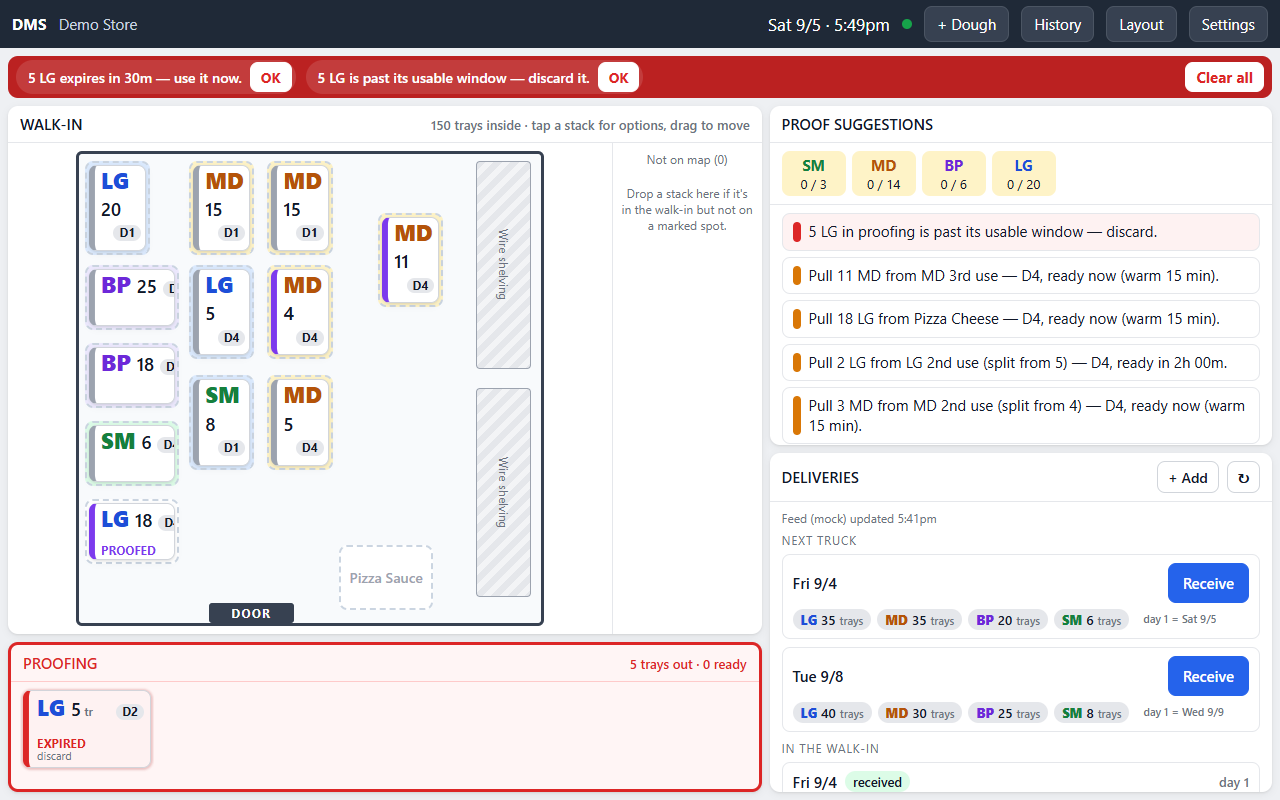
DMS is a kiosk on a tablet at the walk-in door. It knows every stack of dough in the walk-in and on the proofing rack: what size it is, what day it is on, how long it has been out, and when it is ready or has to go. It tells the crew what to pull and when, plans where a delivery goes, alarms when dough is ready or past its window, and counts what was used each night.
What you need
Section titled “What you need”- One Windows 11 tablet, ten inches or so, mounted in landscape outside the walk-in door. A Surface Go 2 works well. The hardware guide has the details.
- Power at the door. DMS runs entirely on the tablet, so nothing else is needed day to day; Wi-Fi is for truck orders, settings from the console, and updates.
- A PizzaBot account with the store added and DMS turned on. See Stores and products.
Set up the tablet
Section titled “Set up the tablet”- Follow the install page to run PizzaBot Setup on the tablet, and tick DMS.
- When Setup shows a pairing code, pair the tablet to the store from your phone. The pair page says the code installs DMS; confirm it.
- Let Setup restart the tablet. It opens into DMS.
Before the first truck
Section titled “Before the first truck”A paired tablet takes its store settings and walk-in layout from the console, so set those up first. On the Devices page, tap Manage DMS for the tablet:
- Walk-in layout. Draw the room: the dough spots, which size each lane holds, which spot is nearest the door, shelving, and the door. The tablet shows this map.
- Store settings. The dough sizes the store stocks, proof targets per size for each weekday, closing times, and the time for the nightly dough count.
Review and send, and the tablet has them within a few seconds. DMS settings and the console goes through every field.
If dough is already in the walk-in when the tablet goes up, add it with + Dough in the header: pick the size, the day 1 date, how long it has already proofed, and the count, then tap the spot it sits in. See Working with dough.
The daily rhythm
Section titled “The daily rhythm”- Truck day. The next truck is already listed under Deliveries, with sizes and counts, when your franchise’s HQ is connected. Tap Receive, confirm what came off the truck, and follow the placement plan. See Receiving a truck.
- Through the day. The suggestion cards say what to pull and when. Tap Proof on a card, or tap a stack and move it to the rack. Ready and discard alarms sound at the top of the screen. The Take a tray buttons log each tray that goes to the line.
- Close. At the time set in the console the Count dough sheet opens. Slide each stack to what is really on the dolly and tap Looks good. See Nightly count and usage.
How DMS counts dough days
Section titled “How DMS counts dough days”Day 1 is the day after delivery; dough is not used or proofed on the day it arrives. Each stack carries a day badge, D1 to D6, and its proof time and usable window shrink as it ages. On the last day the stack is flagged, and past it the stack reads OUT OF DATE until it is discarded. Proof time is cumulative: a stack that comes out twice keeps its warm minutes, so a stack pulled back into the walk-in is still counted correctly.